
YouTube Channel ID Finder – Find Any YouTube Channel ID Instantly
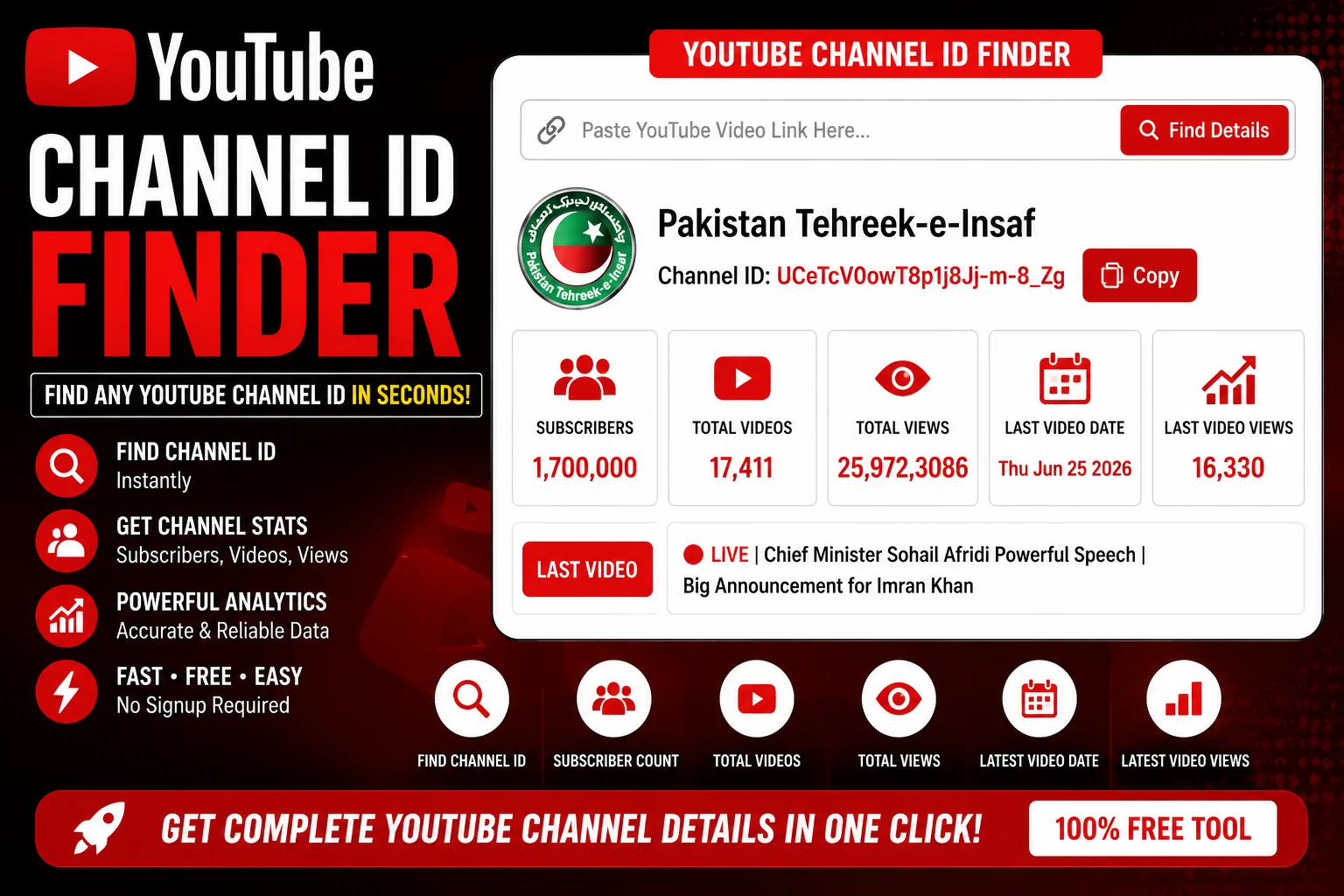
🔍 Need a YouTube Channel ID but don’t know where to find it?
Whether you’re a developer working with the YouTube Data API, a marketer building competitor analysis dashboards, or a creator looking to embed your channel feed, you need the unique Channel ID – the permanent identifier that never changes, even when you rebrand your handle or display name.
If you’ve ever stared at a YouTube channel page wondering how to find that elusive UC-prefixed ID, you’re not alone. The YouTube Channel ID Finder tool makes this process effortless. Simply paste any YouTube channel URL, @handle, legacy username, or even a video URL, and the YouTube Channel ID Finder instantly extracts the permanent Channel ID along with channel name, subscriber count, total views, video count, and other valuable analytics.
This comprehensive guide will walk you through everything you need to know about YouTube Channel IDs – what they are, why creators and marketers need them, how the YouTube Channel ID Finder works, and how you can use this powerful tool to streamline your workflow.
📑 Table of Contents
- YouTube Channel ID Finder: What Is a Channel ID
- YouTube Channel ID Finder: Why Creators Need Channel IDs
- YouTube Channel ID Finder: How the Tool Works
- YouTube Channel ID Finder for YouTube Creators
- YouTube Channel ID Finder for Marketers
- YouTube Channel ID Finder Advanced Tips
- YouTube Channel ID Finder Benefits
- YouTube Channel ID Finder FAQs
- YouTube Channel ID Finder Conclusion
YouTube Channel ID Finder: What Is a Channel ID
A YouTube Channel ID Finder helps you locate the unique, permanent identifier assigned to every YouTube channel. A YouTube Channel ID is a string of characters that follows a specific format: “UC” followed by 22 alphanumeric characters, such as UC_x5XG1OV2P6uZZ5FSM9Ttw [citation:11]. This YouTube Channel ID never changes – unlike @handles or display names, which creators can modify as their brand evolves.
The YouTube Channel ID Finder is essential because YouTube’s Data API v3 exclusively uses these Channel IDs to identify channels [citation:11]. Without a YouTube Channel ID Finder, you’d need to manually inspect page source code or navigate through YouTube Studio settings to find this information.
It’s important to understand the relationship between a YouTube Channel ID and other channel identifiers:
- YouTube Channel ID (UC…): Permanent, unique, machine-readable identifier used by APIs [citation:2].
- @Handle: Human-readable username introduced in 2022 that can be changed [citation:2].
- Legacy Username: Older format like youtube.com/user/username that is no longer required [citation:3].
- Display Name: The visible channel name that can be changed anytime.
A YouTube Channel ID Finder bridges the gap between these formats, converting any channel URL, handle, or username into the permanent Channel ID you actually need.
YouTube Channel ID Finder: Why Creators Need Channel IDs
Creators, developers, and marketers need a YouTube Channel ID Finder for a variety of practical applications. Here are the most common use cases where finding the right YouTube Channel ID becomes essential:
YouTube Data API Integration
The YouTube Channel ID Finder is crucial for anyone working with the YouTube Data API v3. All API operations that work with channels use Channel IDs exclusively [citation:11]. Whether you’re building a content aggregator, creating a custom analytics dashboard, or automating video uploads, you’ll need the YouTube Channel ID for every API call.
RSS Feed Subscriptions
To subscribe to a channel’s video feed without YouTube’s platform, you need the Channel ID. The feed URL format is youtube.com/feeds/videos.xml?channel_id=UC... [citation:2]. A YouTube Channel ID Finder helps you quickly obtain the ID for any channel you want to monitor.
Embedded Player Configuration
When embedding YouTube players on external websites with channel-specific features like subscribe buttons, you need the Channel ID. The YouTube Channel ID Finder tool makes this a one-click operation.
Analytics and Competitive Research
Channel IDs are used in analytics tools like YouTube Studio, third-party analytics platforms, and competitor tracking dashboards. A YouTube Channel ID Finder helps you quickly add new channels to your monitoring list.
Official Artist Channel (OAC) Requests
Musicians requesting Official Artist Channel status from YouTube need to provide both their personal channel ID and topic channel ID. Using a YouTube Channel ID Finder ensures you provide valid, accurate IDs [citation:9].
Content Management Systems
Video CMS platforms often require Channel IDs for content ingestion, rights management, and distribution workflows. The YouTube Channel ID Finder simplifies the process of collecting IDs for multiple channels.
📊 Did You Know?
Over 500 million hours of video are watched on YouTube every day. Channels that integrate API-driven workflows using Channel IDs see significantly faster content distribution and analytics reporting compared to manual methods.
YouTube Channel ID Finder: How the Tool Works
The YouTube Channel ID Finder operates by fetching publicly available data from YouTube’s channel pages in real time. It supports five different input methods [citation:2]:
Input Methods
- Full Channel URL: Paste any YouTube channel page URL – including /channel/, /c/, and /@handle formats.
- @Handle: Enter any YouTube handle – the tool converts it to the permanent Channel ID.
- Legacy Username: Supports older /user/username format URLs.
- Video URL: Paste any YouTube video URL – the tool extracts the uploading channel’s ID [citation:2].
- Direct Channel ID: Validate an existing Channel ID and retrieve channel details.
What the YouTube Channel ID Finder Returns
- Channel ID: The unique UC-prefixed permanent identifier
- Channel Name: The display name of the channel
- @Handle: The current handle associated with the channel
- Subscriber Count: Total number of subscribers
- Total Views: Lifetime view count across all videos
- Video Count: Total number of public videos uploaded
- Channel Description: The about section text
- Verification Status: Whether the channel is verified
A YouTube Channel ID Finder differs from browser extensions that only show the ID of the current page [citation:1]. Our YouTube Channel ID Finder works with any YouTube URL you provide, making it far more versatile for research, competitive analysis, and bulk operations.
YouTube Channel ID Finder for YouTube Creators
For YouTube creators, the YouTube Channel ID Finder serves as an essential tool for managing your channel presence and expanding your reach. Here are the specific ways creators benefit from using a YouTube Channel ID Finder:
Finding Your Own Channel ID
Your YouTube Channel ID is available in YouTube Studio under Settings → Channel → Advanced Settings [citation:5]. However, the YouTube Channel ID Finder provides a faster alternative – simply paste your channel URL and instantly see your ID along with your subscriber count and other statistics.
Managing Multiple Channels
Creators who manage multiple channels need organized access to each channel’s YouTube Channel ID. The YouTube Channel ID Finder tool makes it easy to collect and record IDs for all your channels in one place.
Collaboration and Guest Appearances
When collaborating with other creators, you often need to provide your Channel ID for proper attribution and playlist inclusion. A YouTube Channel ID Finder helps you quickly share the correct ID without navigating through settings menus.
Third-Party Tool Integration
Many creator tools – from analytics platforms to scheduling apps – require your Channel ID for authentication and data access. The YouTube Channel ID Finder ensures you have the right ID ready when setting up new tools.
🔍 Find any YouTube channel ID instantly – including subscriber count, views, and channel analytics.
Use YouTube Channel ID Finder Now →YouTube Channel ID Finder for Marketers
Marketers and SEO professionals rely on the YouTube Channel ID Finder for research, competitive analysis, and campaign management. The YouTube Channel ID Finder transforms how marketers approach YouTube data collection:
Competitor Analysis
Using a YouTube Channel ID Finder, marketers can quickly gather data on competitor channels – subscriber counts, upload frequency, and audience engagement metrics. This information is critical for benchmark analysis and strategy development [citation:4].
Influencer Outreach
When building influencer lists, the YouTube Channel ID Finder helps you collect accurate Channel IDs for each creator you’re researching. Combined with subscriber counts and other statistics, you can prioritize outreach based on real data [citation:4].
Bulk Channel Research
Advanced YouTube Channel ID Finder tools support bulk lookup – processing up to 20 channels at once and exporting results as CSV or TXT files [citation:2]. This makes the YouTube Channel ID Finder perfect for large-scale research projects and database building.
Ad Campaign Targeting
YouTube advertising campaigns often require Channel IDs for targeting specific channels or excluding certain content. The YouTube Channel ID Finder ensures you have the correct IDs for your campaign configuration.
Content Aggregation
When building content recommendation engines or aggregation platforms, you need accurate Channel IDs for proper content attribution and feed integration. The YouTube Channel ID Finder provides the reliable data you need [citation:4].
YouTube Channel ID Finder Advanced Tips
For power users, these advanced YouTube Channel ID Finder tips will help you maximize efficiency and accuracy:
Bulk Lookup Workflows
Using the YouTube Channel ID Finder’s bulk lookup feature, you can process multiple channels simultaneously. Paste up to 20 URLs, handles, or channel IDs – one per line – and the YouTube Channel ID Finder returns a results table you can copy, download as CSV, or export as TXT [citation:2].
API Integration
Advanced users can integrate YouTube Channel ID Finder results directly with the YouTube Data API. Once you have the Channel ID, you can make authenticated API calls to retrieve video data, playlist information, and more [citation:6][citation:11].
Database Management
For teams maintaining channel databases, the YouTube Channel ID Finder’s export features make it simple to update records with accurate Channel IDs, subscriber counts, and other analytics.
Cross-Platform Workflows
Combine the YouTube Channel ID Finder with other tools like Google Sheets, Zapier, or CRMs for automated reporting and lead management. The exported CSV data integrates seamlessly with most business platforms [citation:4].
YouTube Channel ID Finder Benefits
The YouTube Channel ID Finder delivers clear advantages over manual methods of finding Channel IDs:
Time Savings
Manually finding a Channel ID requires navigating YouTube Studio, clicking through settings menus, or inspecting page source code. The YouTube Channel ID Finder delivers results in seconds, saving hours of repetitive work.
Accuracy
The YouTube Channel ID Finder pulls data directly from YouTube’s public page data, ensuring 100% accuracy [citation:1][citation:2]. No more typos or copy-paste errors when working with long alphanumeric strings.
Versatility
Supporting five input methods, the YouTube Channel ID Finder works with any YouTube format you encounter – full URLs, handles, legacy usernames, video URLs, or direct Channel IDs [citation:2].
No API Key Required
Unlike the YouTube Data API which requires authentication and API keys, the YouTube Channel ID Finder works without any setup or registration. It’s completely free with no usage limits [citation:2].
Privacy-First
The YouTube Channel ID Finder processes all data locally in your browser. No data is collected, stored, or shared – ensuring your research remains private [citation:1].
Bulk Processing
Advanced YouTube Channel ID Finder features support bulk lookup of up to 20 channels simultaneously, with export capabilities for CSV and TXT formats [citation:2].
| Feature | Manual Method | YouTube Channel ID Finder |
|---|---|---|
| Time per Channel | 2-5 minutes | Under 5 seconds |
| Input Formats Supported | Only URL | URL, @Handle, Video URL, Username, Direct ID |
| Additional Data | None | Subscribers, Views, Videos, Description |
| Bulk Processing | No | Up to 20 channels at once |
| Export Options | Copy/Paste only | CSV, TXT, Clipboard |
| Privacy | N/A | 100% local browser processing |
For additional YouTube content creation and management, explore these complementary tools:
- YouTube Copyright Checker – Ensure your videos are free from copyright claims before uploading.
- YouTube Copyright Tool – Advanced copyright scanning and protection for YouTube creators.
- YouTube Subscribe Link Generator – Create one-click subscribe links for your channel.
🚀 Find YouTube Channel IDs, subscriber counts, and channel analytics in seconds – completely free.
Try YouTube Channel ID Finder →YouTube Channel ID Finder FAQs
A YouTube Channel ID is a unique, permanent identifier assigned to every YouTube channel. It follows the format UCxxxxxxxxxxxxxxxxxxxxxx – “UC” followed by 22 alphanumeric characters. Unlike handles or display names, the Channel ID never changes, making it the definitive way to reference a channel in APIs and developer tools [citation:2][citation:11].
You can find a YouTube Channel ID using the YouTube Channel ID Finder tool. Simply paste any YouTube channel URL, @handle, legacy username, or video URL, and the tool instantly extracts the permanent Channel ID along with channel name, subscriber count, and other statistics [citation:2].
YouTubers need Channel IDs for YouTube Data API calls, RSS feed subscriptions (youtube.com/feeds/videos.xml?channel_id=UC...), embedded player configurations, analytics dashboards, content management systems, and channel-level advertising targeting. The Channel ID is the only way to unambiguously reference a YouTube channel in code [citation:2][citation:11].
Yes, the YouTube Channel ID Finder tool provides channel statistics including subscriber counts, total views, video count, and other analytics when you search by Channel ID, URL, handle, or video link [citation:2][citation:4].
Yes, every YouTube Channel ID is globally unique. No two channels share the same ID. This permanence and uniqueness make the Channel ID the most reliable identifier for any YouTube channel, regardless of name changes or handle updates [citation:2].
For more information about YouTube Channel IDs and how they work with the YouTube Data API, refer to the YouTube Help Center or explore the YouTube Data API documentation. You can also find valuable creator education resources at the YouTube Creator Academy.
YouTube Channel ID Finder Conclusion
The YouTube Channel ID Finder is an indispensable tool for anyone working with YouTube data – whether you’re a creator managing your own channel, a marketer researching competitors, a developer building YouTube-integrated applications, or an SEO professional tracking video performance. A YouTube Channel ID Finder transforms the tedious process of hunting for Channel IDs into a simple, one-click operation.
With the YouTube Channel ID Finder, you can find any YouTube Channel ID instantly. Simply paste a channel URL, @handle, legacy username, or video URL, and the YouTube Channel ID Finder returns not just the ID, but also subscriber counts, total views, video counts, and other valuable channel analytics. Bulk lookup features let you process up to 20 channels at once, with export options for CSV and TXT formats.
Stop wasting time navigating YouTube Studio menus or inspecting page source code. Use the YouTube Channel ID Finder today – it’s fast, accurate, and completely free, with no API key or registration required.
🔍 Find any YouTube channel ID instantly – including subscriber count, views, and channel analytics.
Use YouTube Channel ID Finder Now →