Chrome Table Extractor for Fast Web Table Capture
Capture HTML tables from webpages, select one or multiple tables, and export clean structured data to Excel, CSV, JSON, Markdown, or Google Sheets with Neksio Table Capture v1.0.7.
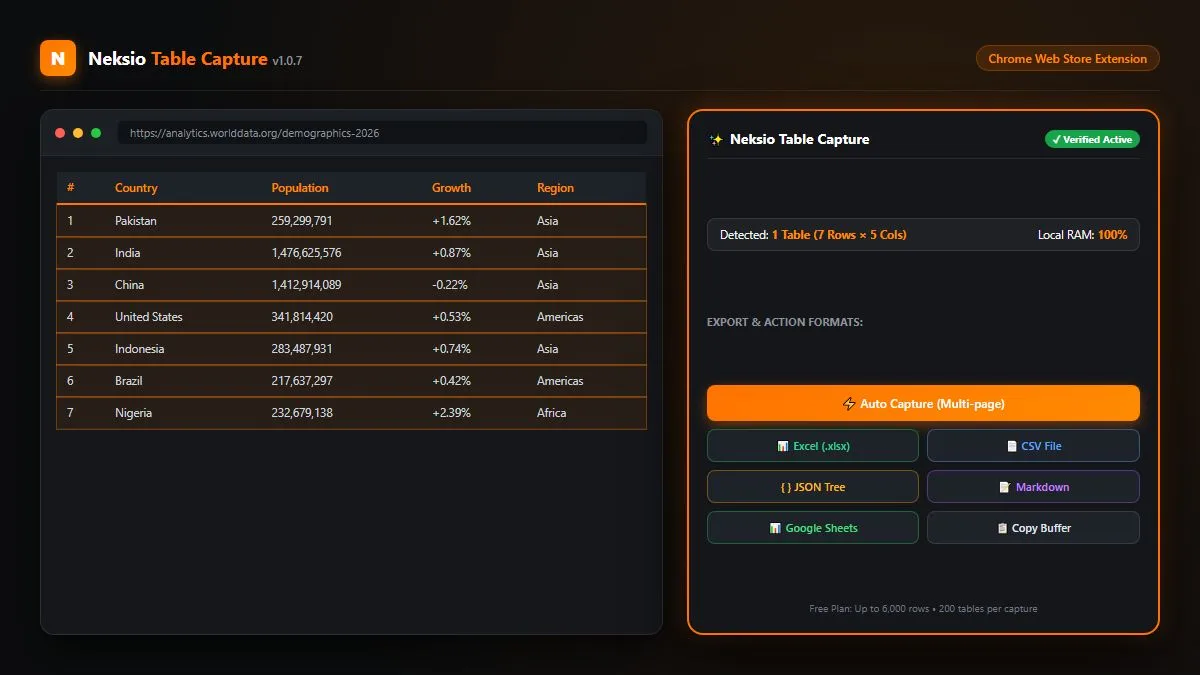
Everything You Need to Capture Web Tables
Detect, select, capture and export structured web table data directly from your browser with complete precision and privacy.
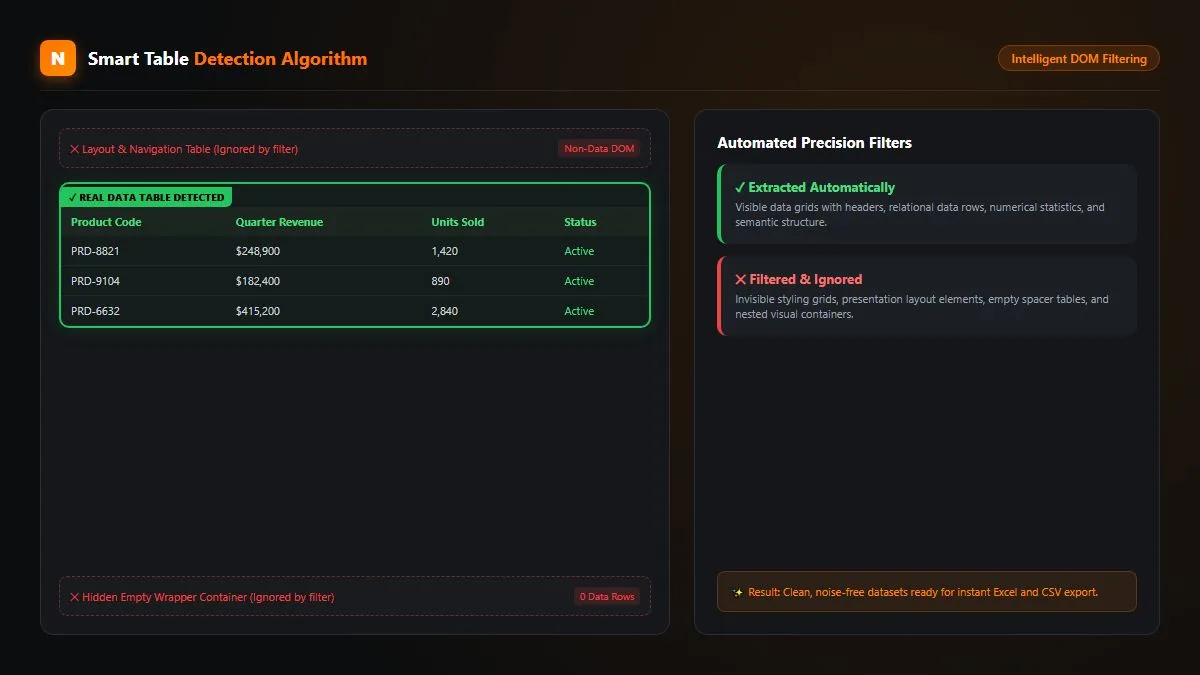
Smart Table Detection
Pulls real data tables in while automatically ignoring empty wrapper containers, navigation grids, and layout wrappers.
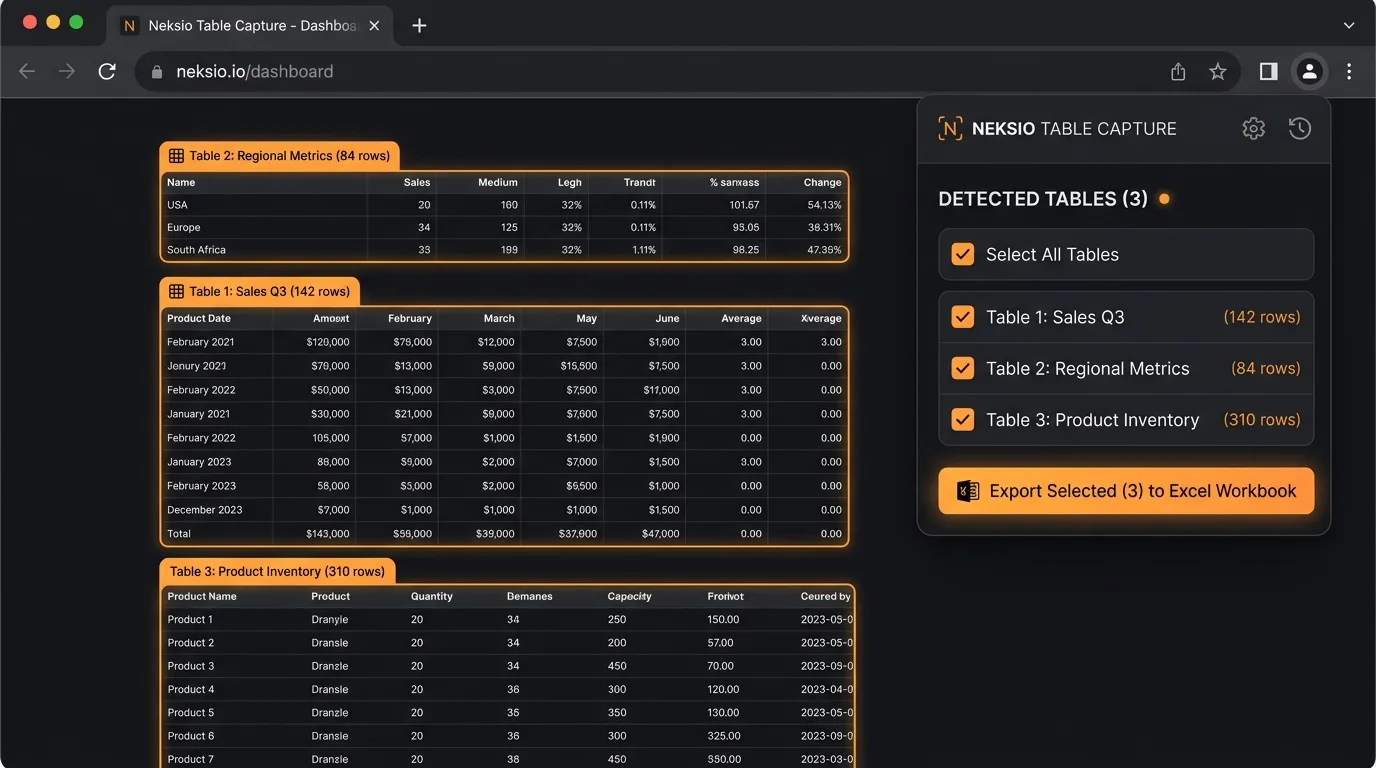
Multi-Table Capture
Detect every table on the page simultaneously, tick the specific ones you need (or Select All), and package up to 200 tables at once.
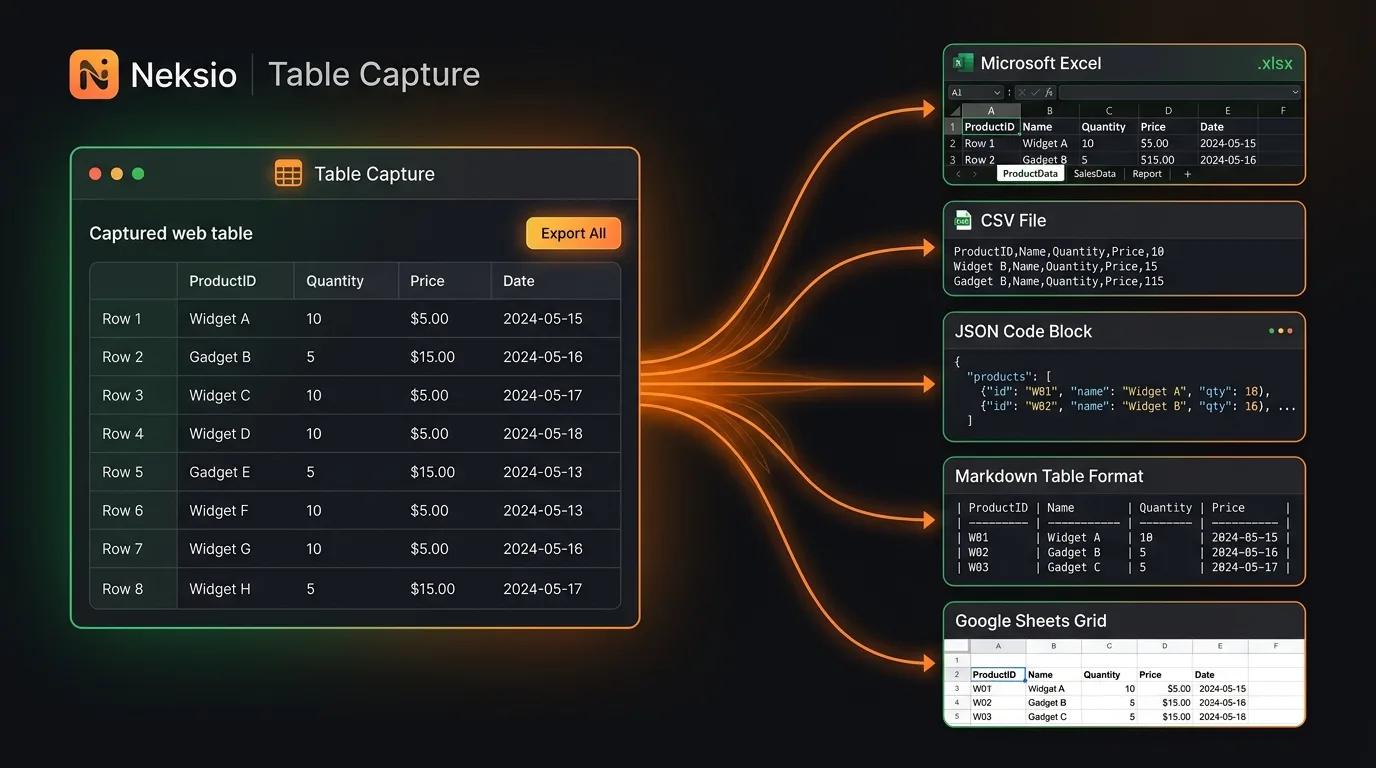
Excel Workbook (.xlsx)
Organize multiple tables into a single .xlsx file, where each captured table is automatically placed on its own structured worksheet.
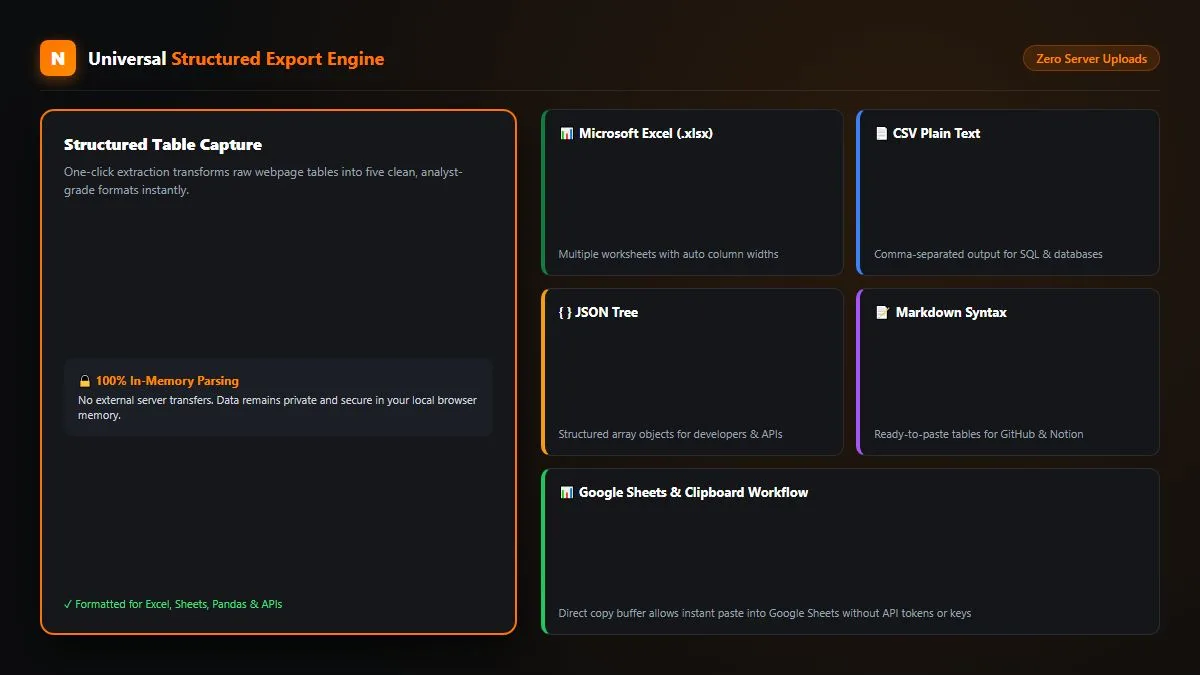
Export Anywhere
Download clean CSV, structured JSON trees, Markdown tables for Notion/GitHub, or copy directly into Google Sheets with Ctrl + V.
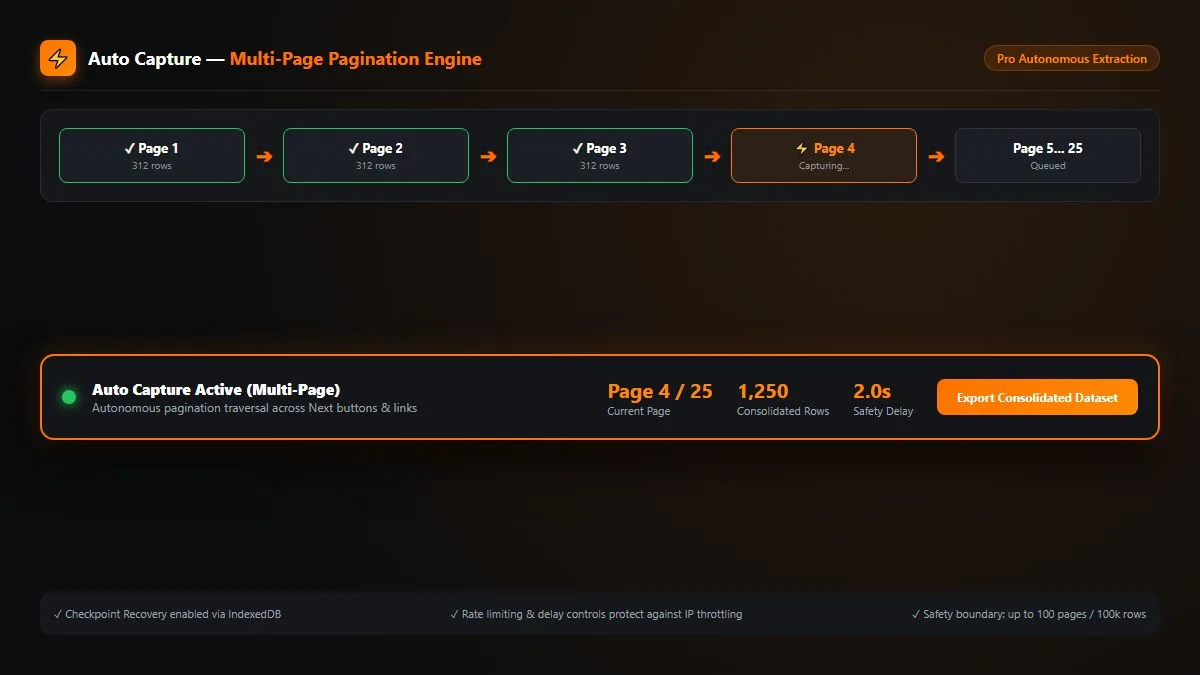
Auto Capture — Multi-Page Pagination
Extract data across multi-page web tables automatically. Neksio Table Capture Pro autonomously navigates pagination buttons (Next, Page 1..N) and stitches all rows into a single consolidated dataset.
- ✓ Autonomous Next-button pagination navigation
- ✓ Configurable delays between pages (2–3s) & page limits
- ✓ IndexedDB session persistence & checkpoint recovery
Why Choose Neksio Table Capture?
The lightweight, secure browser extension designed for data analysts, developers, researchers, and business professionals.
Fast & Responsive
Detects tables instantly and packages them into downloadable documents or clipboard copies in milliseconds.
Local Processing
Privacy-first. Your captured web table data is processed entirely in your browser memory and never uploaded to any external server.
Multilingual & RTL
Faithfully captures tables in global languages and character sets including Urdu, Arabic, Japanese, Hindi, and Chinese.
Structured Formatting
Preserves merged rows, headers, and cell alignment, calculating auto-column widths for clean imports.
Product Gallery
See Neksio Table Capture in action. Explore the tools, workflows and Pro capabilities behind Neksio Table Capture v1.0.7.
Neksio Table Capture
Real-time DOM scanner with single-click table detection and multi-format exports.
Smart Table Detection
Automatically identify useful HTML data tables while filtering layout elements.
Multi-Table Capture
Detect every table simultaneously, select target tables, or package up to 200 tables at once.
Excel Workbook (.xlsx)
Package multiple extracted tables into a single .xlsx file with dedicated worksheets.
Multi-Format Export
Download clean CSV, structured JSON, Markdown tables, or copy for Google Sheets.
Auto Capture — Multi-Page
Autonomously traverse pagination controls and stitch multi-page tables together.

Neksio Table Capture Pro
Unlock unlimited rows*, 200 tables per capture, and advanced automation workflows.
Want to automate multi-page table capture?
Upgrade to Neksio Table Capture Pro for pagination automation, custom safety delays, and persistent session recovery.
Ready to automate your table extraction?
Upgrade to Neksio Table Capture Pro to unlock unlimited rows*, multi-page Auto Capture, and persistent session recovery.
HTML Table Extractor Features
Explore verified Free and Pro capabilities in Neksio Table Capture v1.0.7 for fast web table extraction and pagination automation.
Single & Multi-Table Capture
Capture single tables on demand or extract up to 200 tables on the same webpage simultaneously. Use individual checkboxes or hit "Select All Tables" for effortless batch extraction.
✓ Supports single-click popup capture, dockable in-page workshop panel, and right-click context menus.
Smart Detection & Auto Column Width
Our intelligent DOM parser isolates meaningful data tables while discarding invisible layout elements, empty wrapper divs, and navigation menus. Auto column widths ensure your spreadsheets open perfectly formatted.
✓ Preserves headers, merged cells, numerical precision, and international UTF-8 characters.
Multi-Worksheet Excel (.xlsx) Export
Exporting multiple tables? Neksio Table Capture packages all your selected tables into a single Microsoft Excel (.xlsx) workbook, assigning each table to its own dedicated worksheet automatically.
✓ Also supports CSV plain text, JSON trees, Markdown tables, and direct clipboard buffer copy.
Auto Capture across Multi-Page Pagination
Stop clicking next manually. Pro users can trigger Auto Capture to follow pagination links (.next, rel="next", page numbers) and consolidate hundreds of pages into a single dataset with configurable safety delays.
Upgrade to Neksio Pro ➔
Complete Feature Matrix
Excel Workbook (.xlsx)
Separate worksheets per table in one workbook with calculated readable column widths.
Developer JSON Export
Clean array-nested key-value pairs formatted for developers and API ingest pipelines.
Markdown Formatting
Ready-to-paste markdown table blocks optimized for Notion, GitHub, and docs.
Google Sheets Workflow
Copy tables directly to your clipboard and paste cleanly into Google Sheets with Ctrl + V.
Multilingual & RTL Support
Preserves Urdu, Arabic, Hindi, Spanish, Chinese, and non-Latin datasets faithfully.
100% In-Memory Privacy
Zero external server uploads. Your data remains strictly within your local machine.
How to Extract Tables from a Website
Converting complex HTML grids into clean structured spreadsheets takes under ten seconds. Follow our simple visual workflow.
1. Detect Real Tables
Navigate to any webpage. Click the Neksio toolbar icon or right-click to scan the DOM. Smart detection automatically highlights real data tables and filters out layout noise.
2. Select Target Tables
Review detected tables in the popup or workshop overlay. Tick individual tables you need or select all tables at once for batch operations.
3. Capture or Auto-Traverse
Extract single-page tables instantly into memory, or launch Pro Auto Capture to automatically traverse multi-page pagination and stitch all rows together.
4. Export Structured Files
Choose your destination: Download Excel workbook (.xlsx with separate tabs), CSV, JSON, Markdown, or copy to clipboard for Google Sheets.
Automate Multi-Page Table Capture
Have 20+ pages of product catalogs or public records? Let Neksio Pro extract them automatically.
Neksio Table Capture Free vs Pro
Compare Free and Pro capabilities in Neksio Table Capture v1.0.7 to choose the right plan for your workflow.
- ✓ Up to 6,000 rows per capture
- ✓ Up to 200 tables per session
- ✓ Single & multi-table extraction
- ✓ Excel (.xlsx) multi-sheet export
- ✓ CSV, JSON, Markdown & Clipboard
- ✓ Google Sheets copy/paste workflow
- ✓ 100% in-browser local privacy
- ✓ Unlimited rows* per capture
- ✓ 200 tables per capture session
- ✓ Auto Capture across multi-page pagination
- ✓ Custom pagination selectors & delays
- ✓ IndexedDB session persistence & recovery
- ✓ Cryptographically signed ECDSA P-256 license
- ✓ Everything in Free included
Detailed Comparison Table
| Feature / Capability | Free Plan | Pro Plan |
|---|---|---|
| Row Limits per Capture | Up to 6,000 rows | Unlimited rows (100k safety cap) |
| Tables per Capture Session | Up to 200 tables | Up to 200 tables |
| Single-Table & Multi-Table Capture | ✓ Included | ✓ Included |
| Multi-table Selection + Select All | ✓ Included | ✓ Included |
| Excel (.xlsx) Workbook Export (Multi-sheet) | ✓ Included | ✓ Included |
| Smart Detection & Auto Column Width | ✓ Included | ✓ Included |
| CSV / JSON / Markdown / Clipboard Export | ✓ Included | ✓ Included |
| Google Sheets Copy/Paste Workflow | ✓ Included | ✓ Included |
| Multilingual & RTL Preservation (Urdu, Arabic, Hindi, etc.) | ✓ Included | ✓ Included |
| Auto Capture across Multi-Page Pagination | — | ✓ Autonomous Multi-Page Engine |
| Custom Pagination Selectors & Delays | — | ✓ Configurable Delays & Page Limits |
| IndexedDB Session Persistence & Recovery | — | ✓ Session Checkpoints & Recovery |
| Cryptographically Signed Entitlement (ECDSA P-256) | — | ✓ Authoritative Neksio Central License |
Neksio Table Capture Support
Answers to common questions about features, limits, exports, and Pro licensing. Need further assistance? Contact us.
Contact Neksio Table Capture
Need help or have questions regarding Neksio Table Capture or license activation? Send us a message.
Email support
support@neksiotool.com
Reply time
Within 24 business hours, Mon–Fri
Sales & partnerships
Agency plans, custom licensing, resellers
Neksio
Remote-first · Worldwide
Need smarter image SEO?
Explore Neksio Image Alt Optimizer Pro to auto-generate image alt tags using focus keywords.
Explore Alt Optimizer ProNeksio Table Capture Privacy Policy
Effective Date: October 5, 2026 · Neksio Table Capture Chrome Extension v1.0.7
This Privacy Policy applies specifically to the Neksio Table Capture browser extension (Manifest V3, v1.0.7) and its official website at https://neksiotool.com/neksio-table-capture/. We are committed to transparency, local-first privacy, and minimal data processing.
1. Webpage & Captured Table Data (100% Local In-Browser Processing)
Neksio Table Capture is architected around a local-first processing engine:
- DOM Inspection & Extraction: When you invoke the extension to detect or capture HTML tables, DOM parsing, cell extraction, table filtering, auto-column width calculations, and file formatting (.xlsx, CSV, JSON, Markdown) are executed entirely in your local browser JavaScript memory.
- Zero External Transmission: Your captured table data, cell values, and webpage contents are never uploaded to, stored on, or processed by Neksio servers or third parties.
- No AI or Cloud Parsing: Table detection and extraction rely strictly on deterministic client-side DOM parsers without cloud-based AI processing.
2. Chrome Extension Permissions & Purpose
Neksio Table Capture uses Manifest V3 and requests only the minimal permissions required for table capture and file export:
- activeTab: Allows the extension to read HTML table elements and DOM structures on the active browser tab only when you explicitly invoke the extension popup, in-page workshop, or context menu.
-
storage:
Used to save your local extension settings (language preferences, pagination delay, page limits, installation identifier) and cached Pro entitlement tokens in
chrome.storage.local. - downloads: Enables downloading generated files (Excel .xlsx, CSV, JSON, Markdown) directly into your local computer's default Downloads directory.
- contextMenus: Provides a convenient right-click shortcut on webpage tables to launch table extraction or open the workshop panel.
The extension does not request broad background host permissions, webRequest interception, browser history access, or identity/profile permissions.
3. Local Browser Storage & IndexedDB Usage
The extension uses local browser storage mechanisms strictly on your device:
- chrome.storage.local: Stores local preferences, the installation UUID, and the cryptographic license entitlement cache.
- IndexedDB (NeksioTableCaptureProDB): Used in Pro Auto Capture for temporary multi-page session checkpointing and chunked row assembly. All IndexedDB data resides strictly within your local browser database and can be deleted at any time.
4. License Activation & Neksio Central Licensing Communication
We maintain a strict boundary between table data and technical licensing:
- Free Tier: Operates 100% offline with zero server calls.
-
Pro License Validation: When activating or verifying a Pro license key, the extension communicates over HTTPS with Neksio Central (
https://api.neksiotool.com). -
Technical Licensing Data Transmitted: Verification requests send strictly:
license_key,product_slug(neksio-table-capture), random 36-characterinstallation_id(UUID RFC 4122), and extensionversion(1.0.7). - No Browsing History or Table Data: Visited URLs, webpage addresses, table headers, and table data are never transmitted in licensing requests.
- Asymmetric Verification: Neksio Central issues cryptographically signed entitlements using ECDSA P-256 (SHA-256), which are verified locally via the browser WebCrypto API.
5. Google Sheets Workflow
Neksio Table Capture enables exporting to Google Sheets using a direct system clipboard workflow:
When you click "📋 Copy" or "📊 Google Sheets", table data is formatted and placed into your local operating system clipboard buffer for you to paste (Ctrl + V) into your Google Sheets spreadsheet. The extension does not request Google OAuth account access, cloud storage tokens, or automated Google Drive API synchronization.
6. Contact & Support Communications
If you contact us via the contact form on our website or email support@neksiotool.com, we collect your name, email address, inquiry category, and message text solely to respond to your question or provide technical assistance. We do not sell or share contact details with third-party marketers.
7. Data Retention & User Control
- Local Data: Captured table data is kept in memory or temporary local storage/IndexedDB only during your active capture session.
- Deletion: You can purge all locally stored settings, sessions, and license tokens at any time by clearing your browser's extension storage or uninstalling the extension.
- Licensing Records: License activation records at Neksio Central are retained for active subscription validation and license lifecycle management.
8. Third-Party Services & Trackers
The Neksio Table Capture Chrome Extension contains zero third-party analytics trackers, zero advertising scripts, and zero user-fingerprinting SDKs.
9. Security Practices
We implement standard, robust security practices:
- Encrypted Licensing Transport: All licensing calls to Neksio Central use HTTPS / TLS 1.3 encryption.
- ECDSA P-256 Signatures: Entitlements are signed with asymmetric cryptography, preventing local license tampering.
- In-Memory XML Sanitization: Cell contents are sanitized in memory to prevent malformed XML injections during Excel workbook compilation.
10. Privacy Inquiries & Contact
If you have questions about this Privacy Policy, your data privacy rights, or Neksio Table Capture, please contact our engineering and privacy team:
Email: support@neksiotool.com / privacy@neksiotool.com
Official Website: https://neksiotool.com/neksio-table-capture/
Neksio Tool Team
Our Other Products
From the same team — professional tools for WordPress and web productivity.
Neksio Image Alt Optimizer
Generate, manage, and improve image ALT text using smart rules, focus keywords, and bulk processing tools.
NeksioPress
Professional WordPress reset tool for developers. Instantly clean your database with soft or nuclear reset modes.
Neksio Login & File Security
Secure login forms, track logins, prevent file path traversal exploits, and monitor directory integrity changes.
Neksio Media Optimizer
Optimize and convert images to lightweight WebP, set size parameters, and speed up page load speeds automatically.
Neksio Database Manager
Clean database tables, run optimization routines, backup databases, and restore records efficiently.