Pencil Sketch Photo
Free online Pencil Sketch Photo tool. Quick, fast, and 100% free Image & Media utility with zero installation or sign-up required.
Pencil Sketch Photo Converter Online Free
Transform your photos into realistic pencil drawings using client-side edge detection algorithms. Customize sketch darkness, adjust fine details, and download high-resolution art directly in your browser with complete privacy. No Signup • Free • HD Quality
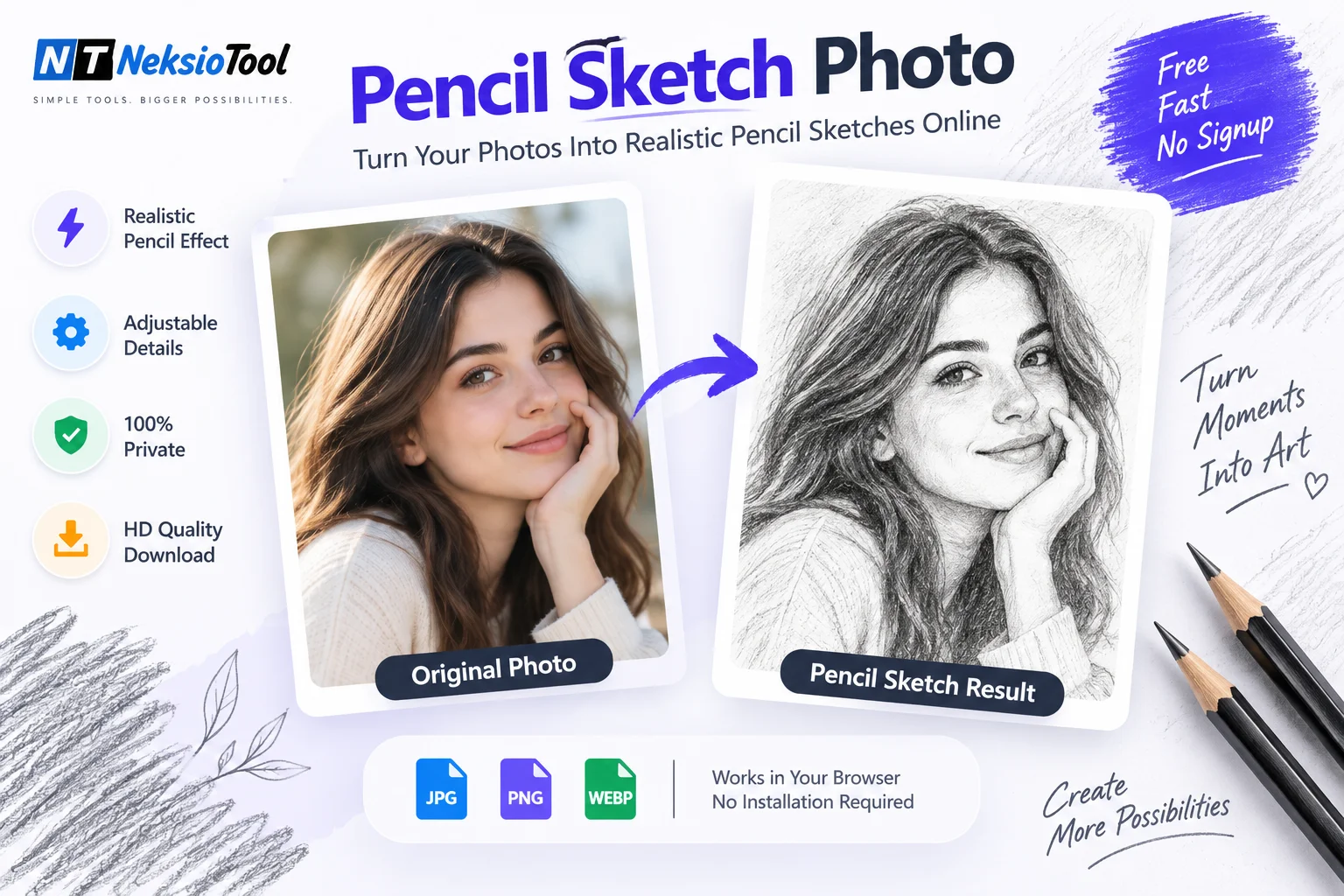
Original Photo
Pencil Sketch Result
How to Convert Photo to Pencil Sketch Online Free
Convert any photo into a realistic pencil sketch using client-side edge detection algorithms. Unlike basic grayscale filters, our algorithm isolates outlines, calculates contrast gradients, and simulates authentic graphite pencil strokes. If you prefer classic vintage tones instead of artistic sketches, explore our black and white image converter, or compress your final sketches for social media avatars using our image compressor.
Professional Sketch Effect in 3 Simple Steps
- Upload Photo: Click or drop any JPG, PNG, or WEBP photo into the canvas upload zone.
- Adjust Darkness & Detail: Fine-tune stroke intensity and outline contrast using real-time controls.
- Download HD Sketch: Save your watermark-free graphite sketch instantly to your device.
Why Choose Our Pencil Sketch Photo Converter?
Simulates authentic graphite strokes and paper shading using edge-contrast calculations.
Advanced edge mapping isolates fine lines, facial contours, and shadow gradients.
Executes 100% in your browser using HTML5 Canvas for instant results without server queues.
Control sketch darkness and edge sharpness for subtle outlines or bold portraits.
Your photo never leaves your device; processing occurs entirely inside browser memory.
Download clean, high-definition PNG images ready for personal or commercial use.
Popular Use Cases
Our pencil sketch photo converter is designed for artists, designers, educators, and social media creators:
Portrait Sketching
Turn personal portraits and family photos into elegant graphite pencil drawings.
Architectural & Landscape Outlines
Convert urban buildings, house photos, and scenery into sharp line art drawings.
Social Media Avatars & Logos
Create artistic profile pictures, story visuals, and stylized creative avatars.
Educational & Coloring Templates
Generate clear line drawings for art class exercises, coloring sheets, and stencils.
Related Guide & Tutorial
How to Convert Photo to Pencil Sketch in 3 Easy Steps
📖 Estimated Reading Time: 7 minutes | 🔄 Last Updated: July 2026 How to Convert Photo to Pencil Sketch in 3 Easy Steps (Free Tool)...
Read Article →Frequently Asked Questions
Q: How is this different from basic grayscale filters?
A: Most basic tools simply invert colors or desaturate. Our pencil sketch photo tool uses Sobel edge detection and stroke synthesis for realistic graphite shading and contour isolation.
Q: Will my uploaded photo be saved on your server?
A: No. All conversion algorithms execute locally in your web browser via HTML5 Canvas. Your image is never uploaded to Neksio servers.
Q: Can I convert photos to sketch on mobile devices?
A: Yes! The pencil sketch photo tool is fully responsive and works on iPhone, Android, iPad, and desktop web browsers.
Q: What is the maximum file size supported?
A: You can convert images up to 20MB. For best results, choose photos with clear subject lighting and good contrast.
Q: Do you add watermarks to downloaded sketches?
A: Never! Your pencil sketch photo download is 100% clean with no watermarks, logos, or restrictions.
Q: Can I adjust sketch darkness and detail levels?
A: Yes! Use the darkness and detail sliders above to fine-tune your sketch from soft outlines to dark, dramatic drawings.
Ready to Create Your Pencil Sketch?
Upload your photo above and experience professional pencil sketch conversion in seconds.
✨ 100% Free • No Signup • No Watermark • HD Quality ✨
📖 How to Use Pencil Sketch Photo
Enter or Upload Data
Type, paste, or select your input directly in the interactive Pencil Sketch Photo panel above.
Configure Settings
Adjust customizable options, parameters, or formatting preferences to match your exact workflow requirements.
Process & Export
Click the action button to process instantly in-browser, then copy, download, or save your clean output.
✨ Key Features & Benefits
Ultra Fast In-Browser Execution
Zero server latency. Processing is performed locally on your device for immediate feedback.
100% Privacy Focused
Your sensitive documents, tokens, and data never leave your browser or get saved to disks.
Cross-Platform & Mobile Ready
Optimized for responsive touch interactions across smartphones, tablets, laptops, and 4K displays.
Completely Free Forever
No hidden charges, trial expiration, credit cards, or compulsory account registration.
❓ Frequently Asked Questions
Is Neksio Tools's Pencil Sketch Photo completely free to use? +
Yes, the Pencil Sketch Photo on Neksio Tools is 100% free with zero hidden limits, no trial periods, and no credit card or account registration required.
Is my data and privacy protected while using this tool? +
Absolutely. All processing and calculations are performed directly within your web browser using modern client-side technologies. Your files, text inputs, and data never leave your device and are never stored on external servers.
Can I use Pencil Sketch Photo on my smartphone or tablet? +
Yes, the tool is fully responsive and optimized for touchscreens. It works seamlessly across all devices including iPhone, Android smartphones, iPads, Macs, and Windows PCs.
Do I need to install any browser extensions or software? +
No installation is needed. You can use Pencil Sketch Photo directly in your browser (Google Chrome, Safari, Mozilla Firefox, Microsoft Edge, Opera, or Brave) with instant results.