Barcode Maker Online – Create Custom QR Codes with Logo and Caption
In today’s fast-paced digital world, bridging the gap between physical and digital experiences is more critical than ever. Whether you are running a retail store, managing a restaurant, or launching a marketing campaign, you need a reliable way to connect with your audience instantly. This is where a powerful Barcode Maker Online becomes your best friend. Gone are the days when barcodes were just boring black-and-white lines used solely for checkout counters. Today, they are dynamic, customizable, and visually appealing marketing tools.
If you want to create custom QR codes complete with your brand logo, catchy captions, and unique color schemes, you are in the right place. In this comprehensive guide, we will explore everything you need to know about generating professional barcodes and QR codes, how to customize them for maximum impact, and the best use cases to skyrocket your business engagement.
📑 Table of Contents
What Is a Barcode Maker?
A Barcode Maker Online is a digital tool designed to generate machine-readable codes that store specific data. In the past, creating these codes required expensive, specialized software and hardware. Today, cloud-based generators have democratized this technology, allowing anyone to create high-quality barcodes in seconds.
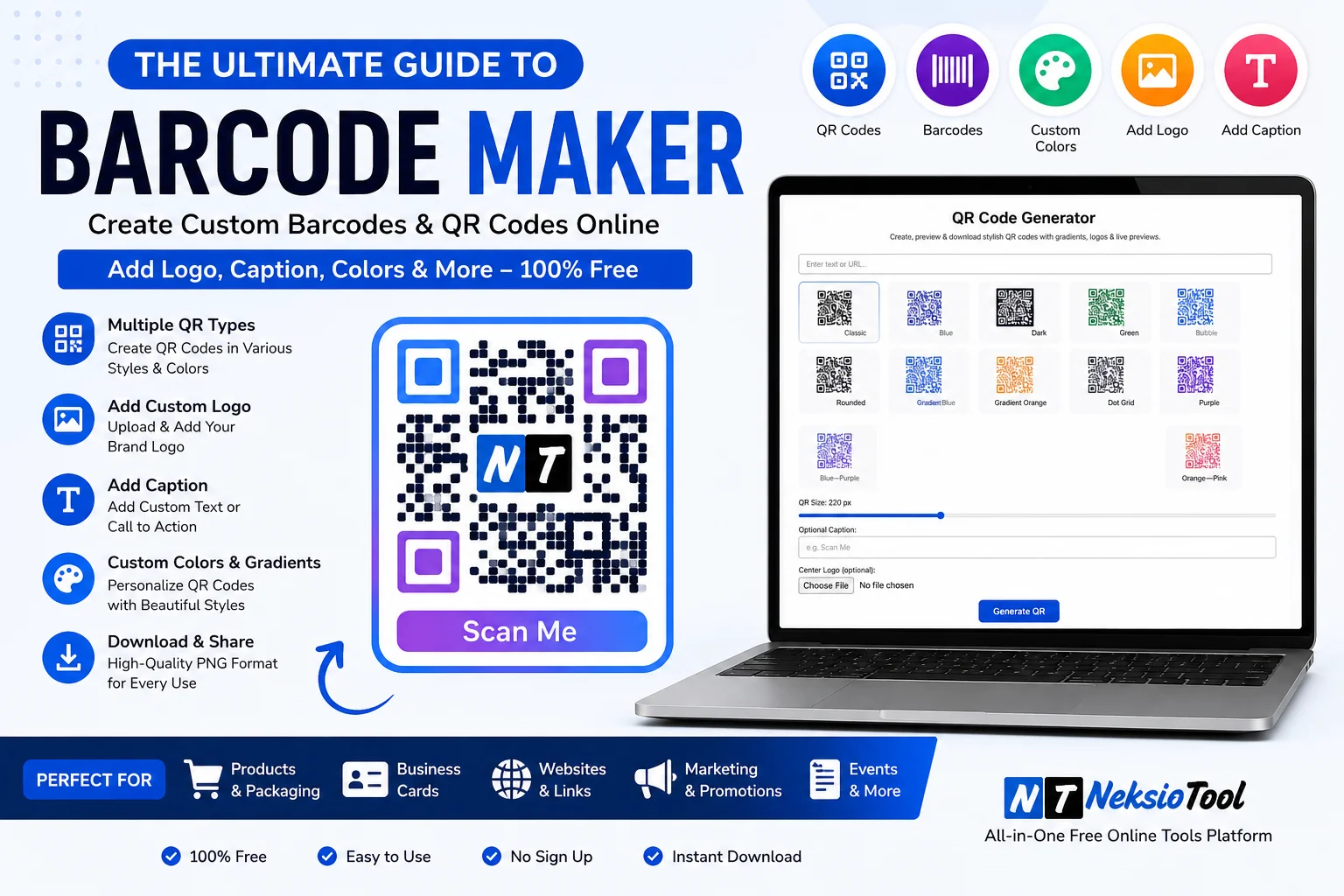
Modern barcode makers do much more than just spit out a generic pattern. They allow you to encode URLs, plain text, Wi-Fi network credentials, vCards (digital business cards), and even event tickets. More importantly, advanced tools let you customize the visual appearance of the code, ensuring it aligns perfectly with your brand identity. When you use a premium Barcode Maker Online like the one at Neksio Tool, you get the perfect blend of functionality, security, and aesthetic customization.
What Is a QR Code? (And How Does It Differ from a Barcode?)
While the terms “barcode” and “QR code” are often used interchangeably, they are technically different. To understand how to use a Barcode Maker Online effectively, you need to know the distinction.
Traditional Barcodes (1D)
Traditional barcodes, such as UPC (Universal Product Code) or EAN (European Article Number), are one-dimensional. They consist of parallel lines of varying widths and store data only horizontally. According to GS1 Global Standards, these are primarily used for retail product identification and inventory management. They can only hold a limited amount of numeric data.
QR Codes (2D)
Quick Response (QR) codes are two-dimensional matrix barcodes. They consist of black squares arranged on a square grid. Because they store data both horizontally and vertically, they can hold hundreds of times more information than a traditional barcode. A QR code can contain alphanumeric characters, special symbols, and even binary data, making it the ultimate tool for digital marketing and customer engagement.
📊 Industry Stat: According to recent marketing reports, over 80% of smartphone users have scanned a QR code at least once, and QR code scans are projected to reach 5.3 billion globally by the end of 2026. Don’t miss out on this massive audience!
Benefits of QR Codes for Modern Businesses
Why should you invest time in finding the right Barcode Maker Online to generate QR codes? The benefits extend far beyond just looking tech-savvy. Here is why QR codes have become an indispensable asset:
- Instant Access to Information: Customers can access websites, menus, or videos instantly without typing long URLs.
- Contactless Experience: Perfect for hygienic, touch-free interactions in restaurants, hospitals, and events.
- Trackable Marketing: Dynamic QR codes allow you to track scan locations, times, and devices to measure campaign ROI.
- Cost-Effective: You can update the destination URL of a dynamic QR code without having to reprint the physical code.
- Versatility: They can store anything from plain text and emails to complex Wi-Fi login details and cryptocurrency addresses.
How to Create QR Codes Online: A Step-by-Step Guide
Creating a professional code is incredibly simple when you have the right tools. Here is how you can use the Neksio Barcode Maker to generate your custom codes in just a few clicks:
Step 1: Choose Your Data Type
Open the tool and select what you want to encode. Do you want to link to a website URL, share a Wi-Fi password, or create a digital business card (vCard)? Select the appropriate format.
Step 2: Enter Your Content
Type or paste your data into the designated fields. Ensure your URLs are correct and your text is free of typos. Remember, once a static QR code is printed, it cannot be changed.
Step 3: Customize the Appearance
This is where the magic happens. Upload your brand logo, choose custom colors, and add a compelling caption. We will dive deeper into these features in the following sections.
Step 4: Download and Test
Download your generated code in high-resolution PNG or SVG format. Crucial Step: Always scan the code with multiple devices (iOS and Android) before printing it on thousands of flyers or packaging boxes!
Add Custom Logo to QR Code: Boost Brand Recognition
A plain black-and-white QR code is functional, but a QR code with your company logo in the center is a branding powerhouse. When users see your logo inside the code, it builds instant trust and reinforces brand recall.
The Science Behind It: Error Correction
You might wonder, “If I cover the middle of the code with a logo, won’t it break?” The answer lies in Error Correction Capacity (ECC). QR codes are designed with built-in redundancy. By setting the error correction level to ‘H’ (High), the QR code can still be read perfectly even if up to 30% of its surface area is obscured by your logo.
Preparing Your Logo
For the best results, your logo needs to be optimized. If your logo file is too large or in the wrong format, it might pixelate when shrunk down into the center of the QR code. Before uploading it to your Barcode Maker Online, use the Neksio Image Resizer to ensure it is perfectly square (e.g., 500×500 pixels). If the file size is too heavy, run it through the Neksio Image Compressor to speed up the generation process without losing visual quality.
Add Caption to QR Code: Drive Action with Context
A QR code without context is like a button without a label. Users are naturally hesitant to scan a random code because they don’t know where it will take them. Adding a clear, concise caption below or around your QR code drastically increases scan rates.
Crafting the Perfect Caption
Your caption should answer the user’s immediate question: “What’s in it for me?”
- Offer an Incentive: “Scan for 20% Off Your First Order!”
- Create Curiosity: “Scan to Watch the Behind-the-Scenes Video.”
- Provide Utility: “Scan to Connect to Our Free Wi-Fi.”
- Drive Engagement: “Scan to Follow Us on Instagram for Daily Updates.”
When using a Barcode Maker Online, look for options that allow you to add text frames or captions directly within the design interface, ensuring the text and the code are perfectly aligned for print.
Custom Colors and Styles: Stand Out from the Crowd
Who says QR codes have to be black and white? Customizing the colors and styles of your QR code allows it to blend seamlessly with your marketing materials, packaging, and overall brand aesthetic.
The Golden Rule of QR Code Colors: Contrast
While you can get creative with colors, you must never compromise on contrast. The scanner needs to distinguish the “modules” (the dark squares) from the “background” (the light area).
DO: Use dark colors (navy blue, dark green, deep purple, or black) for the QR pattern and light colors (white, pastel yellow, light gray) for the background.
DON’T: Use low-contrast combinations like red on green, or yellow on white. Furthermore, avoid using dark backgrounds with light QR patterns, as many standard camera apps are optimized to read dark-on-light codes.
Styling the “Eyes”
The three large squares in the corners of a QR code are called “position detection patterns” or “eyes”. Advanced tools let you change the shape of these eyes from standard squares to rounded circles or even custom dots. This subtle stylistic change can make your code look much more modern and approachable.
Business Uses of QR Codes: Real-World Applications
The versatility of a Barcode Maker Online means QR codes can be deployed across virtually every industry. Let’s explore some of the most impactful business use cases.
1. Product Packaging and Smart Labels
Physical product packaging has limited space. You can’t fit your entire brand story, nutritional details, or video tutorials on a small box. By printing a QR code on your packaging, you unlock infinite digital space. Customers can scan the code to view how-to videos, read detailed ingredient sourcing information, or instantly reorder the product online. Ensure the code is printed clearly by using high-resolution vector files.
2. Restaurant Menus and Ordering
The post-pandemic world permanently changed dining habits. QR codes allow restaurants to offer touchless, digital menus. But it goes beyond just viewing the menu. Smart restaurants use QR codes at the table that allow customers to order and pay directly from their phones, reducing wait times and freeing up staff for better customer service. If you need to resize your digital menu images for the mobile view, the Neksio Bulk Image Resizer is a fantastic tool to have in your arsenal.
3. Event Ticketing and Check-In
Event organizers use QR codes for seamless entry. Attendees receive a unique QR code on their digital ticket. At the venue, staff simply scan the code to verify entry, preventing fraud and eliminating long lines. You can also use QR codes on event badges that, when scanned by other attendees, instantly exchange LinkedIn profiles or digital business cards.
Marketing Uses of QR Codes: Bridging Print and Digital
Marketers love QR codes because they provide a measurable bridge between offline advertising and online conversion. Here is how you can leverage them in your campaigns.
1. Social Media Growth
Getting users to type in your social media handle or search for your profile is friction. Instead, place a customized QR code on your Instagram posts, YouTube video end-screens, or TikTok bio. When users scan it, they are taken directly to your follow page or a Linktree-style hub. This drastically reduces friction and boosts your follower conversion rate.
2. Print Advertising and Billboards
If you are running a print ad in a magazine or a billboard on a highway, a QR code is your best call-to-action. A user driving by or reading a magazine can scan the code and be instantly redirected to a landing page, a special discount offer, or a video ad. Just ensure the QR code is large enough and placed in a safe zone where it won’t be cropped or blurred.
3. Direct Mail and Flyers
Direct mail can feel outdated, but adding a QR code modernizes it. Imagine receiving a postcard with a QR code that says, “Scan to claim your $50 welcome bonus.” The physical mail grabs their attention, and the QR code provides an instant digital reward. This omnichannel approach yields significantly higher ROI than traditional print alone.
Barcode vs. QR Code: Quick Comparison
To help you decide which code to generate using your Barcode Maker Online, here is a quick comparison:
| Feature | Traditional Barcode (1D) | QR Code (2D) |
|---|---|---|
| Data Capacity | Low (20-25 characters) | High (Up to 4,296 characters) |
| Dimensions | Horizontal only | Horizontal and Vertical |
| Primary Use | Inventory, Retail Checkout (UPC/EAN) | Marketing, URLs, Wi-Fi, Contactless Menus |
| Scanning Speed | Requires precise laser alignment | Instant scan from any angle via smartphone |
| Error Correction | None (If damaged, it won’t scan) | Up to 30% (Can scan even if partially damaged) |
| Customization | Strict black/white lines only | Colors, logos, custom shapes, captions |
Frequently Asked Questions
The best Barcode Maker Online allows you to generate high-quality QR codes and traditional barcodes with advanced customization. Neksio Tool’s Barcode Maker is highly recommended because it lets you add custom logos, captions, and unique colors while maintaining perfect scannability, all for free and directly in your browser.
Yes, you can safely add a logo to a QR code. QR codes have built-in error correction capabilities (up to 30%). This means even if a logo covers the center of the code, it will still scan perfectly. Just ensure your logo is properly sized and optimized using an image resizer before adding it.
Custom colors look great but must maintain high contrast. The foreground (the QR pattern) should always be significantly darker than the background. For example, a dark blue QR code on a white background scans perfectly, but a yellow QR code on a white background will fail. Always test your colored QR code before printing.
A traditional barcode (1D) only holds data horizontally and is mostly used for product inventory and pricing (like UPC or EAN). A QR code (2D) holds data both horizontally and vertically, allowing it to store much more information, including URLs, contact info, Wi-Fi passwords, and plain text.
Yes, as long as you use a privacy-focused, browser-based tool. Platforms like Neksio Tool process the barcode generation entirely on your device without uploading your data to external servers, ensuring your business links and contact information remain 100% secure.
Conclusion: Elevate Your Brand with the Right Tools
In conclusion, the way we interact with the physical world has permanently shifted towards the digital. A high-quality Barcode Maker Online is no longer just a utility for warehouse managers; it is a vital marketing instrument for business owners, creators, and marketers alike. By creating custom QR codes with your unique logo, compelling captions, and brand-matching colors, you transform a simple square pattern into a powerful gateway for customer engagement.
Whether you are looking to modernize your restaurant menu, add interactive elements to your product packaging, or drive traffic to your social media pages, the possibilities are endless. The best part? You don’t need to be a graphic designer or a coding expert to do it. With intuitive, browser-based tools, professional-grade barcodes are just a few clicks away.
Don’t let your marketing materials remain static. Bridge the gap between the physical and digital worlds today. Start creating stunning, customized QR codes that not only look fantastic but also deliver real, measurable results for your business.
🚀 Ready to create your custom QR code? Generate professional barcodes with logos, captions, and custom colors in seconds. No sign-up required!
Create Your Barcode Now →