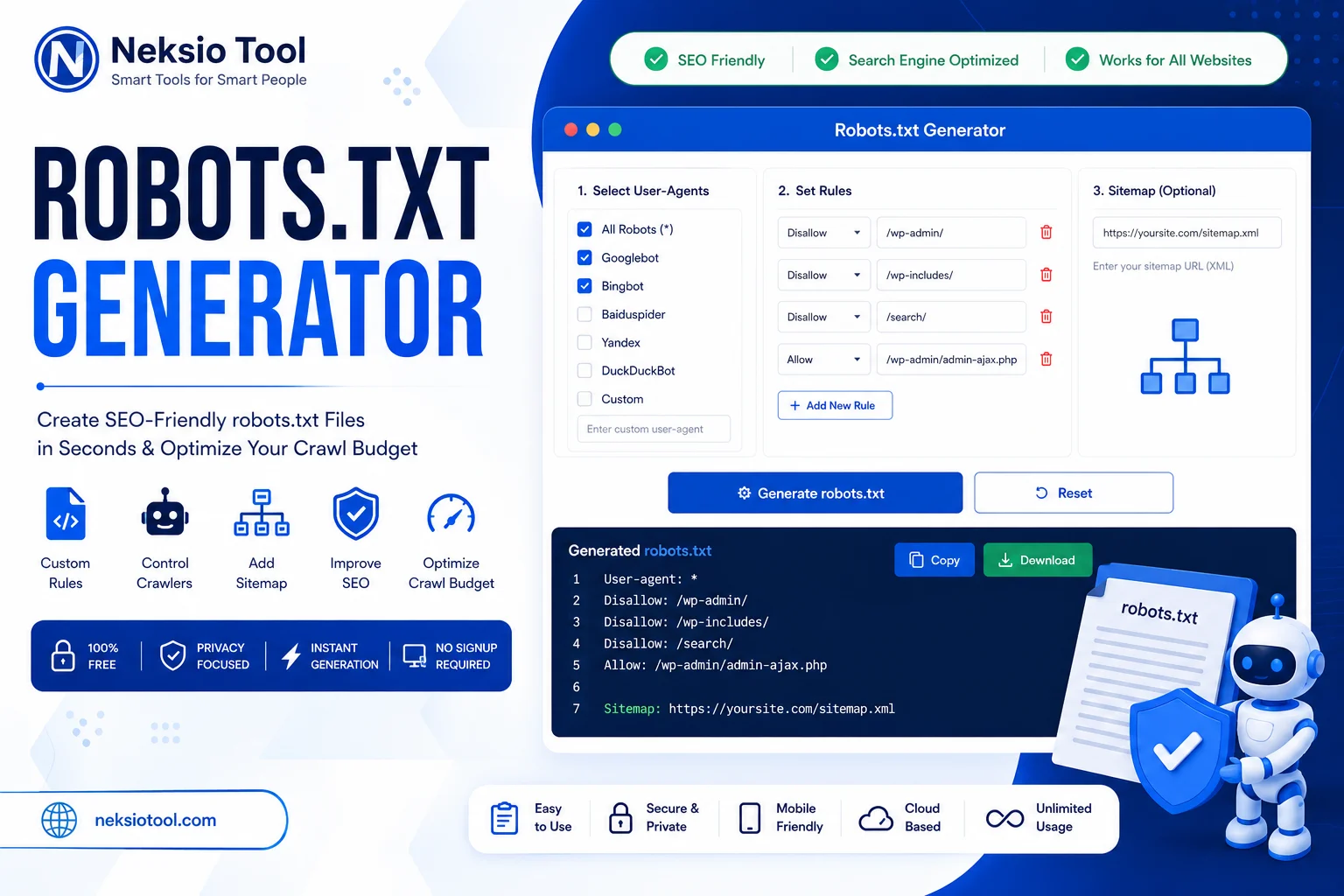
Robots.txt Generator – Create SEO-Friendly Robots.txt Files Online Free
Managing how search engines interact with your website is a foundational pillar of technical SEO. However, manually writing a robots.txt file is fraught with risk. A single syntax error, misplaced slash, or misunderstood directive can accidentally block Googlebot from crawling your entire site, leading to a catastrophic drop in organic traffic. This is precisely why a reliable, error-free Robots.txt Generator is an indispensable tool for webmasters, SEO professionals, and developers.
Whether you are trying to preserve your crawl budget, block aggressive AI scrapers, or simply guide search engines to your XML sitemap, our free Robots.txt Generator simplifies the entire process. It eliminates the guesswork, ensures strict compliance with the official Robots Exclusion Protocol (RFC 9309), and provides instant, ready-to-deploy code. In this comprehensive, EEAT-optimized guide, we will demystify crawl management, explore advanced directives, and show you exactly how to leverage our tool to protect and optimize your website’s search presence.
📌 Quick Summary
- What it is: A free tool to create valid, SEO-safe robots.txt files instantly.
- Core Function: Controls web crawler access (crawling), not search engine indexing.
- Best For: Managing crawl budget, blocking bad bots, and integrating XML sitemaps.
- Key Warning: Never use
Disallowto hide sensitive pages from Google Search. Usenoindexinstead.
📑 Table of Contents
- What is robots.txt?
- What is a Robots.txt Generator?
- Why Every Website Needs robots.txt
- How Search Engines Read robots.txt
- How Google Uses robots.txt
- Critical Comparisons: Sitemap, Meta, Noindex, Canonical
- Understanding Every robots.txt Directive
- Features of Our Robots.txt Generator
- Step-by-Step Guide to Creating Your File
- Real-World Use Cases & Ready-to-Use Templates
- Advanced SEO: Crawl Budget, Security, and Troubleshooting
- Frequently Asked Questions (20 FAQs)
- Key Takeaways & Final Thoughts
What is robots.txt?
A robots.txt file is a plain text file placed in the root directory of a website. It serves as the first point of contact between your website and automated web crawlers (also known as spiders or bots), such as Googlebot, Bingbot, and various AI scrapers. The file provides a set of instructions, known as the Robots Exclusion Protocol, dictating which parts of the website the crawler is permitted to access and which parts it must avoid.
According to the official Google documentation, this file is a standard used by websites to communicate with web crawlers and other web robots. It is important to note that the protocol is advisory, not mandatory. While reputable search engines strictly adhere to these rules, malicious bots may ignore them entirely.
What is a Robots.txt Generator?
A Robots.txt Generator is a specialized web-based utility designed to help users create syntactically perfect robots.txt files without needing to memorize complex rules or risk manual typing errors. Instead of writing code from scratch, users can select their desired rules through an intuitive interface, and the tool instantly compiles the correct plain text output.
For SEO professionals and developers, using a Robots.txt Generator ensures compliance with the latest RFC 9309 standard, preventing costly mistakes that could accidentally deindex a website or waste valuable crawl budget on low-value pages.
Why Every Website Needs robots.txt
While a website can technically function without a robots.txt file (crawlers will assume full access by default), having a properly configured file is a best practice for several critical reasons:
- Crawl Budget Optimization: Search engines allocate a limited “crawl budget” to each site. By disallowing access to low-value pages (like admin panels, search result pages, or duplicate filters), you ensure bots spend their time crawling your most important, revenue-generating content.
- Server Load Reduction: Blocking aggressive or unnecessary bots prevents them from overwhelming your server with requests, improving site speed and stability.
- Privacy and Security (Basic): While not a true security measure, it helps keep benign bots out of sensitive directories (though password protection is required for actual security).
- Sitemap Discovery: It provides a centralized, universal location to declare the URL of your XML Sitemap, ensuring all major search engines can easily find and process your site structure.
How Search Engines Read robots.txt
Understanding the parsing logic of crawlers is vital for effective configuration. When a bot arrives at your domain, it follows a strict sequence:
- Root Check: The bot immediately requests
https://yourdomain.com/robots.txt. - Group Matching: The bot scans the file for a
User-agentline that matches its specific name (e.g.,Googlebot). If no specific match is found, it falls back to the wildcardUser-agent: *group. - Longest Match Rule: If multiple rules apply to a single URL, the crawler follows the rule with the longest matching path. For example, if you have
Disallow: /folder/andAllow: /folder/subfolder/, a request for/folder/subfolder/page.htmlwill be allowed because the “Allow” path is longer and more specific. - Case Sensitivity: URLs in
robots.txtare case-sensitive.Disallow: /Page.htmlwill not block/page.html.
How Google Uses robots.txt
Google uses the robots.txt file primarily to manage its crawling behavior, not its indexing behavior. As outlined in the Google Search Essentials, Googlebot respects Allow and Disallow directives to determine which URLs to fetch.
It is a pervasive SEO myth that adding a page to
Disallow in robots.txt prevents it from appearing in Google Search. This is false. Robots.txt only controls crawling (whether Googlebot can read the page). If other websites link to your disallowed page, Google can still index it (show it in search results) without crawling it, often displaying a snippet like “No information is available for this page.”If you want to keep a page out of Google Search results entirely, you must use a
noindex meta tag or password protection. In fact, if you block a page via robots.txt, Googlebot cannot crawl it to see the noindex tag, which can actually cause it to remain indexed indefinitely!
Critical Comparisons: Understanding the Differences
To master technical SEO, you must understand how robots.txt interacts with other website directives.
robots.txt vs XML Sitemap
| Feature | robots.txt | XML Sitemap |
|---|---|---|
| Primary Purpose | Tells bots what not to crawl. | Tells bots what to crawl and index. |
| Format | Plain text (.txt) | Extensible Markup Language (.xml) |
| Relationship | Can contain a link to the XML Sitemap. | Should only list URLs that are allowed in robots.txt. |
robots.txt vs Meta Robots
robots.txt operates at the server level, blocking the bot before it downloads the page. Meta Robots (e.g., <meta name="robots" content="noindex">) operates at the page level. The bot must be allowed to crawl the page via robots.txt to even see the meta tag. They work best together: allow crawling in robots.txt, but apply noindex in the HTML head.
robots.txt vs noindex
As emphasized earlier, Disallow in robots.txt does not equal noindex. If you want a page removed from search, use the noindex directive in the page’s HTML or HTTP headers. Blocking it in robots.txt will prevent Google from seeing the noindex command.
robots.txt vs Canonical
A Canonical tag tells search engines which version of a duplicate page is the “master” copy. Like noindex, Google must be allowed to crawl the page via robots.txt to read the canonical tag. If you block a duplicate page in robots.txt, Google cannot see the canonical tag pointing to the original, potentially leading to duplicate content issues.
Understanding Every robots.txt Directive
Our Robots.txt Generator handles the syntax for you, but understanding the underlying directives is crucial for advanced SEO.
- User-agent: Specifies which crawler the following rules apply to (e.g.,
User-agent: GooglebotorUser-agent: *for all bots). - Disallow: Instructs the specified user-agent not to crawl the specified path.
Disallow: /blocks the entire site. - Allow: Overrides a broader
Disallowrule, granting permission to crawl a specific sub-directory or file. (Primarily used by Googlebot and Bingbot). - Sitemap: Provides the absolute URL of your XML sitemap, helping bots discover your content faster. (e.g.,
Sitemap: https://example.com/sitemap.xml). - Crawl-delay: Instructs compliant bots to wait a specified number of seconds between requests. Note: Googlebot ignores this directive.
- Wildcards (* and $): The asterisk (
*) matches any sequence of characters. The dollar sign ($) indicates the end of a URL. Example:Disallow: /*.pdf$blocks all PDF files. - Comments (#): Any line starting with a hash symbol is ignored by crawlers. Use comments to document your rules for future reference.
Features of Our Robots.txt Generator
The Neksio Tool Robots.txt Generator is engineered for precision, speed, and security. Here is why it is the preferred choice for SEO professionals:
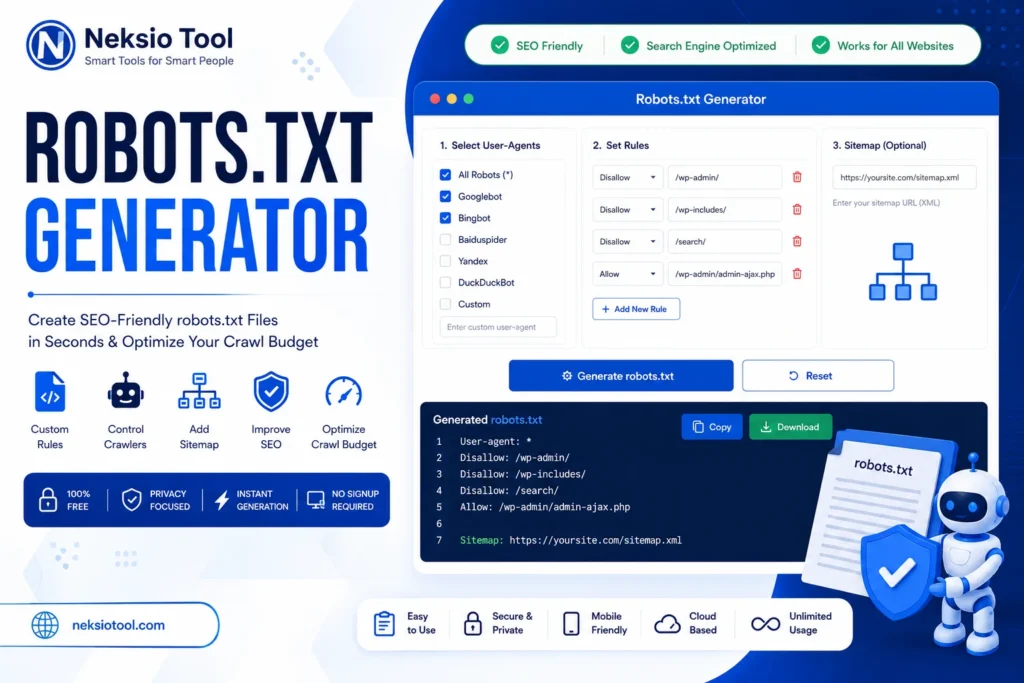
- Generate robots.txt instantly: Real-time compilation of your rules into a valid, downloadable text file.
- Multiple User-Agent support: Easily add specific rules for Googlebot, Bingbot, Yandex, or AI crawlers like GPTBot.
- Allow / Disallow rules: Intuitive interface to build complex, layered access rules without syntax errors.
- XML Sitemap integration: Dedicated field to automatically append your sitemap URL to the bottom of the file.
- Copy to clipboard: One-click copying for quick pasting into your CMS or server.
- Download robots.txt: Instantly download the properly formatted
.txtfile, ready for server upload. - Browser-based processing: All logic runs locally in your browser. No server-side processing means zero latency.
- No registration: Start generating immediately. No accounts, no emails, no paywalls.
- Mobile friendly: Fully responsive design allows you to manage crawl rules from any device.
- Privacy-first: Your website structure and rules are never logged, stored, or transmitted to our servers.
Step-by-Step Guide to Creating Your File
Creating a flawless robots.txt file takes less than two minutes with our tool. Follow this proven workflow:
1. Open the tool
Navigate to the Robots.txt Generator on Neksio Tool.
2. Select crawler rules
Choose the target bot. Use * for all bots, or select specific ones like Googlebot or Googlebot-Image from the dropdown.
3. Add Allow/Disallow paths
Enter the directories or files you want to block (e.g., /wp-admin/) or explicitly allow (e.g., /wp-admin/admin-ajax.php). The tool validates the syntax in real-time.
4. Add Sitemap URL
Paste the absolute URL of your XML sitemap. If you don’t have one, use our free XML Sitemap Generator to create one first.
5. Generate robots.txt
Click the “Generate” button. The tool will compile your inputs into a perfectly formatted plain text block.
6. Copy or Download
Review the generated code. Click “Copy to Clipboard” or “Download .txt File” to save it to your local machine.
7. Upload to your site’s root directory
Use FTP, SFTP, or your hosting control panel’s File Manager to upload the file to the root directory of your domain (e.g., public_html/robots.txt).
8. Verify using Google Search Console
Go to Google Search Console, navigate to the “robots.txt Tester” (under the legacy tools section) or simply use the URL Inspection tool to ensure Googlebot can access your critical pages as intended.
Real-World Use Cases & Ready-to-Use Templates
Different website architectures require different crawling strategies. Below are optimized, ready-to-use templates for the most common platforms.
1. WordPress
WordPress sites need to block the admin area and core files while allowing essential AJAX functionality and search bots.
User-agent: *
Disallow: /wp-admin/
Allow: /wp-admin/admin-ajax.php
Disallow: /wp-includes/
Disallow: /wp-content/plugins/
Disallow: /wp-content/themes/

Sitemap: https://yourdomain.com/sitemap_index.xml
2. WooCommerce
eCommerce sites must protect the checkout process, user accounts, and cart data from being crawled, which wastes budget and creates duplicate content.
User-agent: *
Disallow: /cart/
Disallow: /checkout/
Disallow: /my-account/
Disallow: /*?add-to-cart=
Disallow: /wp-admin/
Allow: /wp-admin/admin-ajax.php

Sitemap: https://yourdomain.com/sitemap_index.xml
3. Blogger
Blogger (Blogspot) has specific paths that should be managed to ensure clean indexing of posts and static pages.
User-agent: *
Disallow: /search
Allow: /

Sitemap: https://yourblog.blogspot.com/sitemap.xml
Pro Tip: For advanced Blogspot management, pair this with our guide on how to Blogger Sitemap Generate for maximum indexation.
4. News Website
News sites need to ensure Google News bots have unrestricted access to articles while blocking archive pages to prevent duplicate content penalties.
User-agent: Googlebot-News
Allow: /

User-agent: *
Disallow: /archive/
Disallow: /print/
Disallow: /wp-admin/

Sitemap: https://yourdomain.com/news-sitemap.xml
5. Portfolio
Creative portfolios should block backend areas but ensure all image and project directories are fully accessible to Googlebot-Image.
User-agent: *
Disallow: /admin/
Disallow: /private/
Allow: /portfolio/
Allow: /images/

Sitemap: https://yourdomain.com/sitemap.xml
6. Agency / Staging Sites
Development or staging environments must be completely hidden from search engines to prevent them from competing with the live site in search results.
User-agent: *
Disallow: /

# NOTE: Ensure staging site is also password-protected at the server level.
Advanced SEO: Crawl Budget, Security, and Troubleshooting
Understanding Crawl Budget
Crawl budget is the number of URLs Googlebot will crawl on your site within a given timeframe. For sites with under 10,000 URLs, this is rarely an issue. However, for large eCommerce sites, news portals, or directories, wasting crawl budget on low-value pages (like faceted navigation filters, session IDs, or admin panels) means your important, revenue-generating pages might not be crawled or updated in the index promptly. Using Disallow strategically is the primary method for optimizing crawl budget.
Managing Googlebot, Bingbot, and AI Crawlers
Not all bots are created equal. While Googlebot and Bingbot are essential for search visibility, the rise of AI Crawlers (like OpenAI’s GPTBot, Common Crawl’s CCBot, or Anthropic’s ClaudeBot) has led many site owners to restrict them to protect proprietary content or reduce server load. You can block them specifically:
User-agent: GPTBot
Disallow: /

User-agent: CCBot
Disallow: /
Common Mistakes to Avoid
- Blocking CSS/JS Files: If you
Disallowyour/wp-content/folder entirely, Google cannot render your page, which can severely harm your rankings. AlwaysAllowessential asset folders. - Using robots.txt for Security: As mentioned,
robots.txtis public. Malicious actors use it to find hidden directories. Always use.htaccesspassword protection for sensitive areas. - Forgetting the Leading Slash: Paths in
robots.txtare relative to the domain root.Disallow: admin/is invalid; it must beDisallow: /admin/.
Troubleshooting Tips
If a page is not being indexed, check your robots.txt first. Use the URL Inspection tool in Google Search Console. If it says “Blocked by robots.txt”, you have a conflict. Review your longest-match rules and ensure you haven’t accidentally blocked the parent directory of the page in question.
Benefits of Using a Generator vs. Manual Coding
| Feature | Manual Coding | Neksio Robots.txt Generator |
|---|---|---|
| Syntax Accuracy | Prone to human error (missing slashes, typos) | 100% RFC 9309 compliant, error-free |
| Speed | Requires memorizing directives and testing | Instant generation in under 60 seconds |
| Wildcard Handling | Complex and easy to misconfigure | Pre-built, validated wildcard patterns |
| Sitemap Integration | Must be manually typed and verified | Dedicated, validated input field |
Frequently Asked Questions (20 FAQs)
A robots.txt file is a plain text file placed in the root directory of a website. It provides instructions to web crawlers (like Googlebot) about which pages or files the crawler can or cannot request from your site.
The robots.txt file must be placed in the root directory of your website’s domain. For example, if your website is https://example.com, the file must be accessible at https://example.com/robots.txt.
No. This is a common SEO myth. Robots.txt only controls crawling, not indexing. If you want to prevent a page from appearing in search results, you must use a ‘noindex’ meta tag or password protection. Blocking a page in robots.txt can actually prevent Google from seeing the ‘noindex’ tag, potentially leaving the page indexed.
You can test your robots.txt file using the ‘robots.txt Tester’ tool within Google Search Console. Simply enter a specific URL on your site, and the tool will tell you whether Googlebot is allowed or disallowed from crawling it based on your current rules.
No, you can only have one robots.txt file per subdomain. However, each subdomain (e.g., blog.example.com and shop.example.com) must have its own separate robots.txt file in its respective root directory.
‘Disallow’ tells crawlers not to access a specific path or file. ‘Allow’ is used to override a broader Disallow rule, granting permission to access a specific sub-directory or file that would otherwise be blocked.
To block all compliant crawlers from your entire site, use: User-agent: *Disallow: /
Target the specific bot name: User-agent: GooglebotDisallow: /
Place the specific bot’s rules first. Crawlers read top-to-bottom and follow the most specific matching User-agent. User-agent: GooglebotAllow: /User-agent: *Disallow: /
The asterisk (*) matches any sequence of characters, and the dollar sign ($) indicates the end of a URL. For example, ‘Disallow: /*.pdf$’ will block all URLs that end with the .pdf extension.
Indirectly, yes. Proper use of robots.txt optimizes your crawl budget, ensuring search engines focus on your high-quality content. However, misusing it to block important resources (like CSS or JS files) can severely harm your SEO by preventing Google from rendering your pages correctly.
Check the “Crawl Stats” report in Google Search Console. It shows how many requests Googlebot made to your site per day. A sudden drop may indicate crawl budget issues or server errors.
No. Robots.txt is a publicly accessible file. Anyone can view it by typing yourdomain.com/robots.txt. Therefore, you should never use it to hide sensitive directories, as it actually draws attention to them. Use password protection instead.
Robots.txt provides site-wide or directory-level crawling instructions to bots before they even request the page. An XML Sitemap actively provides a list of URLs you want search engines to discover and index.
Include the ‘Sitemap’ directive at the end of your robots.txt file, followed by the absolute URL of your sitemap. For example: ‘Sitemap: https://example.com/sitemap.xml’.
If a website does not have a robots.txt file, search engine crawlers will assume they have permission to crawl all publicly accessible pages on the site. While this is fine for small sites, it can waste crawl budget on larger sites.
Add their specific User-agent names to your file. For example: User-agent: GPTBotDisallow: /User-agent: CCBotDisallow: /
Yes, the Neksio Robots.txt Generator is 100% free to use. It requires no registration, processes everything locally in your browser for maximum privacy, and allows unlimited generations and downloads.
No, you do not need to “submit” it. Google automatically looks for it at yourdomain.com/robots.txt. However, you should use the “robots.txt Tester” in GSC to verify it is working correctly.
Yes. Any line that begins with a hash symbol (#) is treated as a comment and is ignored by crawlers. Comments are highly recommended for documenting why certain rules were implemented.
Key Takeaways
- Crawling ≠ Indexing:
Disallowstops bots from reading a page, but it does not guarantee the page won’t appear in search results. Usenoindexfor that. - Protect Crawl Budget: Use
Disallowstrategically to keep bots away from admin panels, cart pages, and duplicate filters. - Never Block Assets: Always allow Googlebot to access your CSS, JS, and image folders so it can properly render and understand your pages.
- Include Your Sitemap: Always append your XML sitemap URL at the bottom of your
robots.txtfile to aid discovery. - Test Before Deploying: Always verify your rules using Google Search Console’s URL Inspection tool to prevent accidental deindexing.
Final Thoughts
Mastering your website’s crawl directives is a hallmark of advanced technical SEO. A well-crafted robots.txt file acts as the gatekeeper of your site, ensuring that search engines spend their valuable time and resources on the content that matters most, while keeping them away from administrative backdoors and duplicate content traps.
However, the margin for error is slim. A single misplaced character can have cascading negative effects on your organic visibility. That is why relying on a professional, rigorously tested Robots.txt Generator is not just a convenience; it is a critical risk-mitigation strategy.
By using the Neksio Tool Robots.txt Generator, you guarantee RFC 9309 compliance, seamless XML sitemap integration (pair it with our XML Sitemap Generator for the perfect setup), and absolute peace of mind. Whether you are managing a simple WordPress blog, a complex WooCommerce store, or a high-traffic news portal, take control of your crawl budget today.
For further technical optimization, ensure your URLs are clean using our Permalink Generator, and if you are managing large datasets, our Byte Converter can help you monitor file sizes. Learn more in our XML Sitemap Generator Guide and Permalink Generator Guide.
🚀 Ready to optimize your crawl budget? Generate a flawless, SEO-safe robots.txt file in seconds. 100% free, instant, and fully compliant!
Generate My robots.txt Now →